Paperless tickets are digital access passes stored on your mobile device that grant entry to events without printing anything. The industry term for these passes is “mobile tickets,” though you’ll also hear “e-tickets” and “virtual tickets” used interchangeably. Understanding how paperless tickets work before you arrive at a venue saves you time, stress, and the risk of being turned away at the gate. The Ticket News breaks down the full process, from purchase to entry, so you can walk in with confidence every time.
How do paperless tickets work from purchase to entry?
Mobile ticketing follows a clear sequence. Each step matters, and skipping one can cause problems at the gate.
- Purchase your ticket online. You buy through an authorized platform, and the system generates a unique digital ticket tied to your account or email address.
- Receive your ticket link. Ticket links are delivered within 7 days before an event, with a final cutoff 48 hours prior. That tight window is intentional. It reduces the time a fraudster has to copy or misuse a stolen ticket.
- Add the ticket to your mobile wallet. Apple Wallet and Google Wallet both support mobile tickets. Adding to your wallet lets you access the barcode offline, which matters at packed venues where cell service is unreliable.
- Arrive at the venue and open your ticket. Your phone displays a QR code or NFC pass. The scanner at the gate reads it in under a second.
- Real-time validation occurs. Digital scanners check validity in real time against a backend database and give immediate pass or fail feedback. Once scanned, the ticket is marked as used and cannot be reused.
The backend database is the part most attendees never see, but it does the heaviest lifting. It stores every ticket’s unique identifier and flags duplicates the moment a second scan is attempted. This is what makes mobile tickets far harder to counterfeit than paper.
Pro Tip: Add your ticket to Apple Wallet or Google Wallet as soon as it arrives. Do not wait until you are standing outside the venue. Wallet tickets load instantly, even with no signal.

What are the key benefits of paperless tickets?
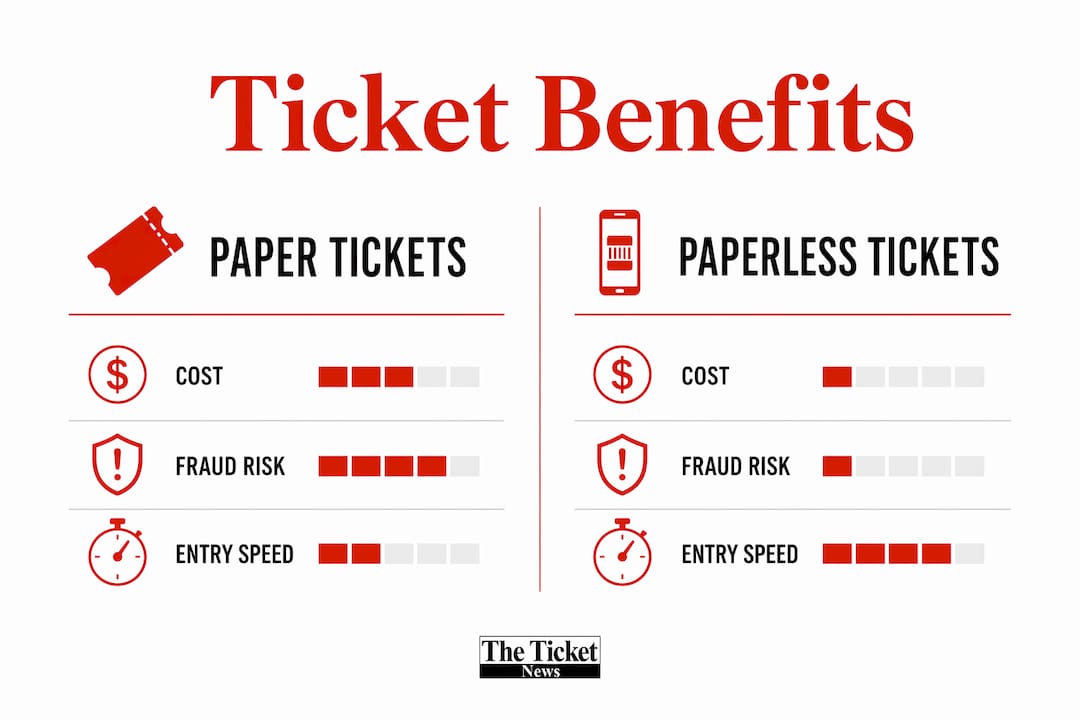
The advantages of mobile tickets fall into three clear categories: speed, security, and cost savings.
Faster entry for attendees
A ticket saved in a mobile wallet offers faster retrieval and scanning compared to a PDF buried in an email. You do not need to search through attachments, zoom in on a blurry image, or wait for a slow email app to load. The barcode is right there on your lock screen. That speed multiplies across thousands of attendees and shortens entry lines noticeably.
Stronger fraud protection
Unique QR codes are encrypted with cryptographic signatures that prevent forgery, and duplicate scans are automatically flagged by the ticketing system. Paper tickets can be photocopied. PDF tickets can be screenshotted and shared. A properly issued mobile ticket cannot be duplicated because the validation system only accepts the first scan. Security of mobile tickets is higher than paper tickets due to single-use validation and tamper detection.
“The shift to QR-based entry is not just about convenience. It closes the fraud loopholes that paper and PDF tickets leave wide open. Every ticket is a one-time key, and the system knows the moment someone tries to use a copy.”
Lower costs for organizers
| Ticket Type | Material Cost Per Ticket | Fraud Risk | Entry Speed |
|---|---|---|---|
| Paper ticket | $5–$15 per ticket | High (easy to copy) | Slower |
| PDF e-ticket | Near zero | Medium (screenshotting) | Moderate |
| Mobile wallet ticket | Near zero | Low (encrypted, single-use) | Fastest |
Switching to QR-based entry reduces material costs to approximately zero compared to paper ticket costs of $5–$15 each. That saving passes through the system in multiple ways. Organizers spend less on printing, staffing ticket booths, and managing physical stock. Those savings can translate to better production budgets and, sometimes, lower ticket prices for attendees.
Key paperless ticket advantages for attendees include:
- No risk of losing a physical ticket
- Easy ticket management from your phone
- Instant delivery without waiting for mail
- Contactless entry that reduces physical touchpoints
- Simpler transfer process through official platform tools
How to use digital tickets effectively and avoid common mistakes
Knowing the pitfalls before you hit them is the difference between a smooth entry and a frustrating one.
Steps to set up your mobile ticket correctly
- Open the ticket email or app notification as soon as it arrives.
- Tap “Add to Apple Wallet” or “Add to Google Wallet” immediately.
- Confirm the ticket appears in your wallet app with the correct event name and date.
- Screenshot the barcode as a backup, but rely on the wallet version at the gate.
- Charge your phone fully before leaving for the event.
The forwarding mistake that invalidates tickets
Forwarding a ticket confirmation email often invalidates the digital ticket. The system ties the ticket to the original recipient’s account. When you forward the email, the link may still open, but the ticket is not properly assigned to the new person. The result is two people showing up with what looks like the same valid ticket, and only one gets in.
The correct method is to use the official “Transfer” function inside the ticketing platform. That function updates the system to assign the ticket to the recipient’s email address, preventing invalidation. Always transfer, never forward.
What to do if the “Add to Wallet” button is missing
Not all tickets are eligible for mobile wallet delivery. Ticket delivery methods depend on the event organizer’s settings and platform capabilities. If the “Add to Wallet” button does not appear, contact the ticket issuer directly. Some tickets are only available as PDFs or mobile website pages, which still work at the gate but require a stronger cell signal to load.
Pro Tip: Before the event, open your wallet ticket and check that the barcode displays clearly. Increase your screen brightness to maximum before you reach the scanner. A dim screen is one of the most common causes of scan failures at entry gates.
How do mobile tickets compare to paper and PDF formats?
The three main ticket formats each carry different trade-offs in security, convenience, and reliability.
| Feature | Paper ticket | PDF e-ticket | Mobile wallet ticket |
|---|---|---|---|
| Fraud risk | High | Medium | Low |
| Entry speed | Slowest | Moderate | Fastest |
| Works offline | Yes | Requires download | Yes (once added to wallet) |
| Risk of loss | High | Low | Very low |
| Transfer method | Physical handoff | Email forward (risky) | Official platform transfer |
| Environmental impact | High | Low | Lowest |
Paper tickets carry the highest fraud risk because they can be photocopied with basic equipment. PDF e-tickets improve on that but remain vulnerable to screenshots being shared. Mobile wallet tickets solve both problems through single-use validation and encrypted QR codes.
The user experience gap is also significant. A paper ticket requires you to keep track of a physical object from purchase day through event day. A mobile ticket lives on a device most people carry everywhere. For attendees who buy concert tickets online weeks in advance, the mobile format removes the anxiety of misplacing something before the big night.
The future of ticketing points firmly toward mobile-first systems. Event managers emphasize the environmental and operational necessity of moving to digital-only ticket systems to reduce costs and material waste. Venues that have already made the switch report faster throughput at gates and fewer entry disputes.
Key Takeaways
Paperless tickets use encrypted, single-use QR codes validated in real time, making them faster, safer, and cheaper than paper or PDF alternatives.
| Point | Details |
|---|---|
| Add tickets to your wallet early | Save your ticket to Apple Wallet or Google Wallet as soon as it arrives to enable offline access. |
| Never forward ticket emails | Use the official Transfer function to reassign tickets; forwarding often invalidates the pass. |
| QR codes prevent fraud | Encrypted, single-use codes are flagged instantly if someone tries to scan a duplicate. |
| Mobile tickets cost less to issue | Organizers pay near-zero material costs versus $5–$15 per paper ticket, improving event economics. |
| Not all tickets support wallet delivery | If the “Add to Wallet” button is missing, contact the issuer for an alternative access method. |
The Ticket News take on mobile ticketing in 2026
The biggest friction point we see is not the technology. It is the communication gap between ticket issuers and attendees. Venues roll out mobile-only entry systems and assume everyone will figure it out. Many do not. The attendees who struggle most are those who receive their ticket link, assume it will “just work,” and show up without ever adding it to a wallet.
Clear ticket design and communication are critical to smooth scanning and reduced delays at entry. That principle applies to both organizers and attendees. Organizers need to send clearer setup instructions. Attendees need to treat the wallet setup step as non-negotiable, not optional.
The security benefits of mobile tickets are real and significant. If you have ever had a paper ticket duplicated or a PDF screenshot shared without your knowledge, you understand why single-use validation matters. The concert ticket scam landscape has shifted. Fraudsters now target the transfer process, not the ticket format itself. That is why using official transfer tools is the single most important habit you can build.
The next wave of mobile ticketing will likely integrate directly with event apps, offering personalized seat upgrades, in-venue navigation, and loyalty rewards tied to your ticket. The QR code at the gate is just the beginning.
— The Ticket News
The Ticket News: your guide to safe event ticketing
Knowing how digital tickets work is only half the equation. Finding trustworthy tickets at fair prices is the other half.

The Ticket News covers upcoming concerts, festivals, and live events with a focus on helping you buy safely and spend wisely. Whether you are tracking down tickets for a major arena show or a local roots festival, our guides walk you through every step. Check out our ticket buying resources for event news, deal alerts, and practical advice on navigating the modern ticketing world. You can also explore our resale buying checklist to make sure every purchase you make is protected.
FAQ
What is a paperless ticket exactly?
A paperless ticket is a digital access pass stored on your mobile device, typically displayed as a QR code or NFC pass, that grants entry to an event without any printed document.
How do I add a ticket to my mobile wallet?
Open your ticket email or app, tap “Add to Apple Wallet” or “Add to Google Wallet,” and confirm the ticket saves correctly. Do this as soon as the ticket arrives, not at the venue.
Can someone else use my digital ticket?
Each digital ticket works only once at the gate. If you need to give a ticket to someone else, use the official Transfer function in the ticketing platform. Forwarding the email often invalidates the ticket.
What happens if my phone dies at the venue?
A dead phone means no ticket display. Charge your phone fully before leaving home, and consider bringing a portable charger. Some venues accept a printed screenshot as a backup, but policies vary by organizer.
Are paperless tickets safer than paper tickets?
Yes. Mobile tickets use encrypted, single-use QR codes that are flagged instantly if a duplicate scan is attempted. Paper tickets can be photocopied, and PDF tickets can be screenshotted and shared, making both formats easier to counterfeit.