Screenshots sometimes get you through the gate and sometimes get you turned away. The deciding factor almost always comes down to whether the ticket uses a static barcode (screenshot-friendly) or a dynamic one that refreshes every few minutes (screenshot-proof). Venue policy can override the technology either way, so the safest habit is checking the rules before you leave home.
TL;DR:
- Static QR code tickets are likely to work with a screenshot at small venues using basic scanning systems, but dynamic codes are usually invalid once they refresh.
- Major stadiums and large festivals often issue rotating or delayed codes that render screenshots unusable, and venue policies may explicitly prohibit screenshot entry regardless of technical feasibility.
- Checking the venue’s FAQ, ticketing platform policies, and adding tickets to digital wallets in advance help ensure access if a screenshot is rejected at the gate.
- If only a screenshot is available, opening the ticket app to refresh the barcode or presenting the original order confirmation can improve chances of entry.
- Organizers ban screenshots primarily to prevent resale fraud through duplicated tickets, favoring live code scanning and official transfers for security.
Table of Contents
- Is Screenshot Ticket Entry Allowed? When It Works And When It Doesn’t
- How Dynamic Barcodes and Mobile-Ticket Protections Actually Work
- Check the Policy Before You Count on a Screenshot
- What to Do If a Screenshot Is All You Have
- Why Organizers Ban Screenshots to Fight Resale Fraud
- The Evidence Behind These Screenshot Rules
- What Actually Prevents Gate-Day Screenshot Problems
- Buy Smarter So a Blocked Screenshot Never Costs You a Show
- Sources
- FAQ
Is Screenshot Ticket Entry Allowed? When It Works And When It Doesn’t
The answer depends entirely on the type of barcode your ticket carries. A static QR code stays the same from the moment it’s issued until the event ends, so a printed copy, an app screen, and a screenshot all scan identically. A dynamic barcode regenerates on a timer, which means the image on your phone right now might be dead in a few minutes.
Many small theaters, local comedy shows, and community venues that use basic ticketing software tend to issue static codes. Screenshots usually work fine at these events because there’s nothing to refresh. Major league sports, arena tours, and festival-scale shows are a different story. Many major events often delay barcode delivery or issue rotating codes to block resale fraud and duplicate entries.
Even a technically scannable screenshot can get rejected if venue policy forbids it outright. A Theatr Help Center article notes that screenshot acceptance varies by ticket type and platform, and the rule isn’t always about whether the code will scan. Staff are often trained to check for the live app or wallet pass regardless of what shows up on the screen.
Here’s a quick way to sort where you likely stand:
- Usually fine: small venues, static print-style tickets, local events with basic scanning setups.
- Usually blocked: major stadium events, festivals with staggered gate entry, any ticket labeled “mobile entry only.”
- Depends on the platform: resale marketplaces and mid-size venues, where policy varies event by event.
How Dynamic Barcodes and Mobile-Ticket Protections Actually Work
A dynamic barcode isn’t a security gimmick. It’s a rotating code tied to your account that regenerates on an interval, sometimes every few minutes, sometimes closer to every few seconds depending on the platform. Lifehacker’s breakdown of the technology explains that a static code scans the same whether it’s printed, pulled up in an app, or screenshotted, but a refreshable code makes a screenshot obsolete the moment it updates.

Some organizers go further and delay barcode delivery entirely. FIFA World Cup 2026 won’t release a ticket’s QR code until a few hours before gates open, and it can only be viewed inside the official mobile app, never downloaded as a PDF. Ticketmaster has adopted similar screenshot-blocking and screen-record prevention on many events, according to its own safety explainer.
These protections exist for two practical reasons: they choke off the secondary market for duplicated tickets, and they simplify the job at the gate. Staff scanning one live code source face far fewer disputes than staff trying to eyeball whether a screenshot is real or reused.
Check the Policy Before You Count on a Screenshot
Before you assume a screenshot will get you inside, run through this short checklist:
- Read your order confirmation email. Most sellers state directly whether the ticket is “mobile entry only” or transferable.
- Check the ticketing app’s help center. Policies differ by platform, and some explicitly list which ticket types tolerate screenshots.
- Look at the venue’s own FAQ page. A venue’s published policy can override what the platform generally allows, especially for high-demand shows.
- Add the ticket to Apple Wallet or Google Wallet if that option appears. Wallet passes often work even without cell service, which a screenshot never will if the code has already rotated.
- If policy forbids screenshots, use the platform’s transfer tool, or contact the box office ahead of time about reissuing the ticket to your device.
Pro Tip: Screenshot your order confirmation, not just the ticket, and save the seller’s contact info in your phone. If your barcode fails at the gate, that confirmation is often the fastest way for staff to verify your purchase without you standing in line for twenty minutes.
What to Do If a Screenshot Is All You Have
If you’re standing at the gate with nothing but a screenshot, don’t panic, work through it in order.
- Open the original ticketing app first and give it a moment to refresh. Many barcode failures resolve the second the live code loads.
- Pull up your order confirmation email and have a photo ID ready in case staff need to match your name to the purchase.
- Ask a staff member, not just a scanner, whether they can verify the purchase manually or complete an on-site transfer.
- If none of that works, head to the box office and ask about reissuing the ticket or your options for a refund and later entry.
Gate staff have seen this exact situation dozens of times a night. Staying calm and cooperative gets you through faster than arguing about whether the screenshot should have worked.
Why Organizers Ban Screenshots to Fight Resale Fraud
Screenshot bans exist largely because screenshots are trivially easy to duplicate and resell to more than one buyer. A single image can be forwarded to five different phones, and without a rotating code or transfer requirement, all five people can show up expecting the same seat.
Managed transfer systems close that gap by tying one valid entry to one account at a time. If you’re buying resale, insist that the seller use the platform’s official transfer feature instead of sending a screenshot directly. Always ask for the original order confirmation as proof the ticket was purchased legitimately, not copied from someone else’s phone. The resale checklist from The Ticket News walks through these verification steps in more detail.

The Evidence Behind These Screenshot Rules
The clearest real-world example comes from FIFA World Cup 2026, which bans screenshots and printed mobile tickets outright and confirms the policy in its own support documentation. For a technical primer on barcode refresh timing, the mechanics are covered in a paperless ticket guide.
What Actually Prevents Gate-Day Screenshot Problems
The pattern we see across ticket disputes is almost always the same: someone assumed a screenshot would work because it worked last time, at a different venue, with a different barcode system. That assumption is the real risk, not the screenshot itself.
Add tickets to your issuing app or digital wallet the moment you buy them, even if you don’t plan to use your phone that day. Never accept a screenshot from a private seller when an official transfer option exists. Keep your order confirmation somewhere you can pull up instantly, because gate lines are the worst place to dig through old emails. None of this is complicated, but skipping it is exactly how avoidable entry problems happen.
— The Ticket News
Buy Smarter So a Blocked Screenshot Never Costs You a Show
A blocked screenshot at the gate is a problem you can avoid days before it happens, not one you fix in line. Guides break down exactly which ticket types travel safely as screenshots and which ones demand an app or a proper transfer, so you know before you buy, not after you’re turned away.

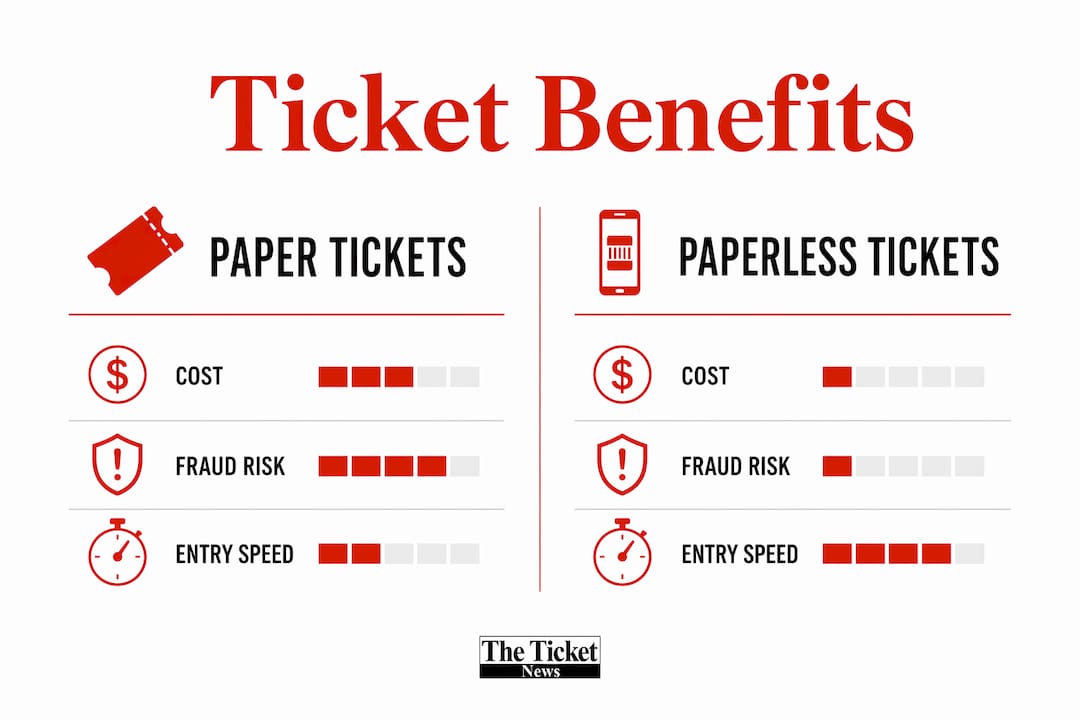
Start with our breakdown of how paperless tickets work to understand barcode timing before your next purchase, and if you’re buying secondhand, run through our resale checklist first. For finding legitimate ticket sources at fair prices in the first place, check a guide to affordable ticket sites before you commit to a seller.
Sources
- FIFA World Cup 2026 ticket delivery information
- I received a screenshot of the ticket. Will that work? | Theatr Help Center
- When a Screenshot of an E-Ticket Will Work (and When It Won’t) | Lifehacker
FAQ
Will a ticket still work if you screenshot it?
It depends on the barcode type. A static code scans fine as a screenshot, but a dynamic, refreshing code will already be outdated by the time you reach the scanner.
Does Ticketmaster allow screenshots of tickets?
Many Ticketmaster events use screenshot-blocking and delayed barcode display as fraud-prevention measures, so screenshots often fail even when they appear to load correctly.
Can you use a screenshot as a ticket?
Sometimes, particularly at smaller venues using static QR codes, but major events with mobile-entry-only rules or refreshable barcodes generally reject screenshots outright.
Can a screenshotted ticket be scanned?
A screenshot of a static code scans the same as the original. A screenshot of a dynamic code usually won’t scan because the live code has already changed.